 BuzzKit
You find free file converters online, toss in your PDF, and just like that—your Word doc shows up in seconds. Feels pretty great, right? For a minute, anyway. Then your antivirus pops up, freaking out about some weird app you definitely didn’t install. Maybe your bank sends you a fraud alert for a login you know wasn’t you.
This isn’t some spooky internet fable. In March 2025, the FBI and security pros started telling everyone: don’t trust those sketchy free file converters sites. Sure, they turn up first on Google and look totally normal. But a lot of them are traps-built to dump malware on your device, steal your info, or just mess with you.
Converting a file shouldn’t put your security at risk. But the trouble isn’t always obvious, and that quick little shortcut can blow up your privacy before you even know there’s a problem. Some shortcuts just aren’t worth it.
Why federal agencies are warning people about file converters
The FBI’s Denver Field Office issued an alert in March 2025 after tracking a wave of complaints tied to sites offering free document, image, and video conversion. Victims searched for something ordinary, like turning a PDF into a Word document or merging two images into one file, clicked a link that looked legitimate, and ended up with an infected device instead of a converted file.
Security news outlets such as BleepingComputer reported on the warning and the same pattern. The sites often rank well in search results or run as paid ads, which is exactly what makes them convincing. A high ranking or a professional-looking homepage tells most users nothing about whether a site is safe.
Free File Converters: How the scam actually works
The trick relies on the fact that converting a file requires uploading it to someone else’s server first. Once your file leaves your device, you have no way to verify what actually happens to it. A malicious converter can:
- Return a file that looks converted but contains hidden, executable code instead of clean data
- Copy or store your original file on its own servers with no obligation to delete it
- Use a domain name that mimics a trusted brand, sometimes swapping a .com for a .co or adding an extra word
- Bundle the download with a browser extension or installer that runs quietly in the background
Cybercriminals specifically target search terms like “free PDF to Word converter” or “merge JPG to PDF” because they know these are high-volume, low-suspicion searches. Most people aren’t thinking about security when they just need a quick file conversion done between meetings.
What’s actually at risk
The consequences go well beyond a slow computer. Investigators have linked fake converter sites to information stealers that harvest saved passwords and banking credentials, and to ransomware that locks down entire devices until you pay. If the file you uploaded contained anything personal- a resume, a scanned ID, tax paperwork, a signed contract- that data may already be sitting on a server you never agreed to trust.
For businesses, the exposure is even bigger. An employee converting a single invoice or client document on the wrong site can hand over information that a company spent years trying to protect.
How to tell if free file converters are actually safe
You can’t always tell by looks alone, but a few checks go a long way:
- Check the actual domain in the address bar, not just the site’s name or logo
- Avoid clicking sponsored search results for conversion tools; type the address directly when you know a trusted one
- Look for a clear privacy policy that explains whether files are stored and for how long
- Be suspicious of any converter that asks you to install software, a plugin, or a “special viewer” to see your result
- Scan any downloaded file before opening it, even if the site seemed fine
The safer alternative: tools that never upload your file at all
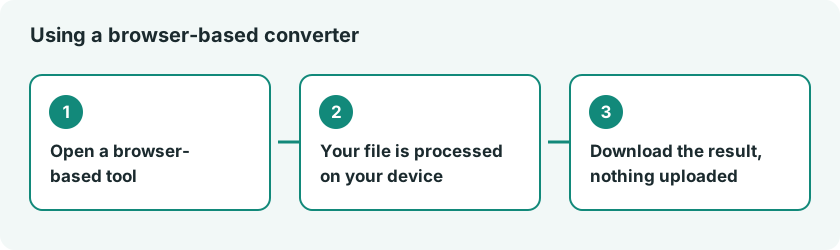
The single biggest risk factor in all of this is the upload step itself. If your file never leaves your device, a scammer can’t intercept, store, or weaponize it. That’s the whole idea behind browser-based tools that process files locally, using your own browser’s engine to do the conversion instead of sending anything to a remote server.
That’s how every tool on BuzzKit works. Whether you’re compressing a video, converting an image, or merging a PDF, the file is processed entirely inside your browser tab. Nothing gets uploaded, no file is kept on any server, and no server in the middle could mishandle or misuse your data. You can check the full lineup of free tools on the Tools page.
Frequently asked questions
Are all free file converters dangerous?
No. Plenty of established, well-reviewed converters are safe to use. The risk comes from unfamiliar sites that rank well in search but have no track record, no transparent privacy policy, and no way to verify what happens to your file after you upload it.
How do I know if free file converters store my data?
Check the site’s privacy policy for language about file retention and deletion. If there isn’t one, or it’s vague about how long files are kept, treat that as a red flag. Tools that process files locally in your browser avoid this question entirely, since your file never reaches a server.
What should I do if I already used suspicious free file converters?
Run a full antivirus scan on your device right away, change passwords for any accounts tied to the file you uploaded, and monitor your bank and credit accounts for unusual activity over the following weeks.
Are browser-based free file converters slower than uploading to a server?
Not necessarily. For most everyday file sizes, local browser processing is just as fast, and often faster, since there’s no upload or download wait involved. It also means your file conversion works even without a great internet connection.
The next time you need to convert a file, take the extra five seconds to check where it’s actually going. It’s a small habit that can save you from a very expensive mistake.